You open your playlist and see 84 videos. The exam is in six days. Pressing play on everything would eat most of that time, and you would still not remember much afterward.
While putting this guide together, I opened a physics lecture playlist and ran into a small problem: the transcript I copied on my laptop only gave me chapter headings, while my phone showed the full text. I explain what went wrong and how to fix it in Step 3.
This guide shows you a step-by-step way to shrink a long playlist into short notes and test yourself on them.
It is written for high school, college, and medical students who learn mostly from YouTube lectures.
Why Rewatching a Playlist Is Not Enough
Watching a lecture again feels productive because everything looks familiar. That feeling is misleading. Recognizing an explanation is not the same as being able to recall it on an exam paper.
Research points the same way. In a well-known 2006 study, Roediger and Karpicke found that students who tested themselves remembered more after two days and one week than students who only restudied the material, even though restudying made students feel more confident. A large review by Dunlosky and colleagues (2013) looked at ten popular study techniques and rated practice testing and distributed practice as high-utility, because they help students of different ages and abilities.
So the goal is not to watch more. It is to shrink the playlist into notes, then test yourself on them.
Step 1: Find the Real Length of the Playlist
Most students look at the video count and panic, or relax, for the wrong reason. A playlist with 11 videos can run 22 hours if each lecture is two hours long. A playlist with 60 videos can be 8 hours if each one is eight minutes.
The number that matters is total hours, not total videos.
Here is how to find it in about a minute.
1. Copy your playlist link. Open the playlist on YouTube. Click the address bar at the top of your browser and copy the whole link. It should look like youtube.com/playlist?list=....
2. Paste it into a playlist length calculator. Open a free playlist length calculator, paste your link into the box at the top, and click Analyze Playlist. Some free tools show an ad first, so wait for the result.
3. Write down three numbers. Scroll down to the result and note the video count, the average video length, and the total length.
The playlist must be public or unlisted. If the calculator shows an error, check that the link is a playlist link and not a single video.
My example: I checked a physics lecture playlist with 84 videos. The average video is about 24 minutes, and the total length is 33 hours 56 minutes. The calculator shows this as “1 day, 9 hours, 56 minutes”, which is the same thing.
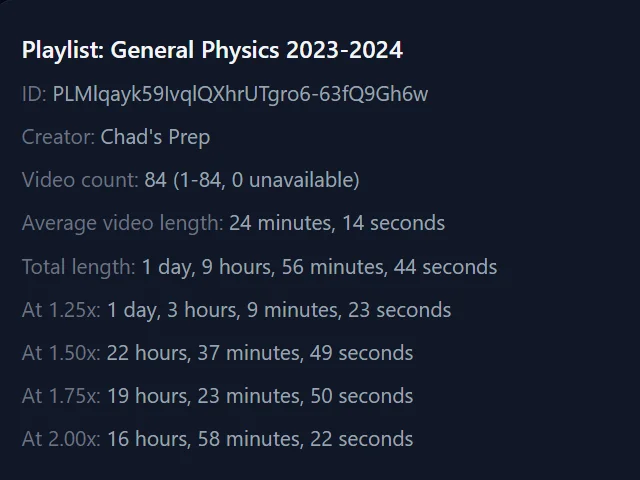
Even at 2x speed, that is still almost 17 hours of watching. So rewatching the whole playlist is not realistic before an exam, which is why the next steps focus on choosing what to revise.
Turn it into days: divide the total hours by the hours you can study each day. For this playlist, studying 4 hours a day would take about 8 to 9 days.
How many hours do you really have?
Be honest here. If your exam is in 6 days, you do not have 6 full days. You have school or college, meals, sleep, and tired hours when nothing sticks.
A realistic goal for many students is 3 to 4 focused hours a day. Over 6 days, that is about 18 to 24 hours in total.
Now compare that with the example playlist, which is almost 34 hours at normal speed. Even at 2x, it takes about 17 hours. That uses most of your study time and leaves only 1 to 7 hours for notes and practice questions. That is the real problem, and it is why the next step is about choosing what to cut.
How long will revision really take?
Video length is only part of it. Pausing and writing adds time. Here is a rough guide:
| Videos | Total length | Normal speed | 2x speed | Notes from transcript | Notes with an AI tool |
|---|---|---|---|---|---|
| 60 | 8 hrs | ~10–12 hrs | ~6–7 hrs | ~5–7 hrs | ~4–6 hrs |
| 30 | 10 hrs | ~12–15 hrs | ~7–9 hrs | ~6–8 hrs | ~5–7 hrs |
| 20 | 15 hrs | ~18–22 hrs | ~11–13 hrs | ~8–11 hrs | ~7–9 hrs |
| 15 | 20 hrs | ~24–30 hrs | ~14–17 hrs | ~11–14 hrs | ~9–12 hrs |
| 30 | 30 hrs | ~36–45 hrs | ~21–25 hrs | ~16–21 hrs | ~13–17 hrs |
| 50 | 40 hrs | ~48–60 hrs | ~28–34 hrs | ~22–28 hrs | ~18–23 hrs |
These are rough estimates that include pausing and short summaries. Your time will change with the subject and how fast you write. Use 2x only for easy topics. Keep hard chapters at normal speed.
Step 2: Sort the Videos Into Three Groups
Go through the video titles (not the videos) and mark each one:
- Green: I know this well.
- Yellow: I remember some of it.
- Red: I do not understand this yet.
Spend most of your time on red, some on yellow, and almost none on green. If your exam covers some topics more heavily, start with the red videos from those topics.
You don’t need to treat every video in a playlist equally.
Step 3: Get the Transcript Instead of Rewatching
For red and yellow videos, the fastest way to revise is often to read the transcript instead of rewatching the video. Reading is usually faster than watching, especially if you skim.
On a laptop:
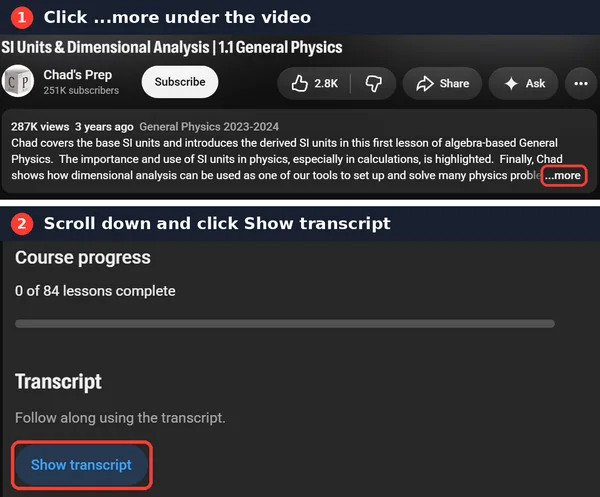
- Under the video, click “…more” in the description, then “Show transcript.”
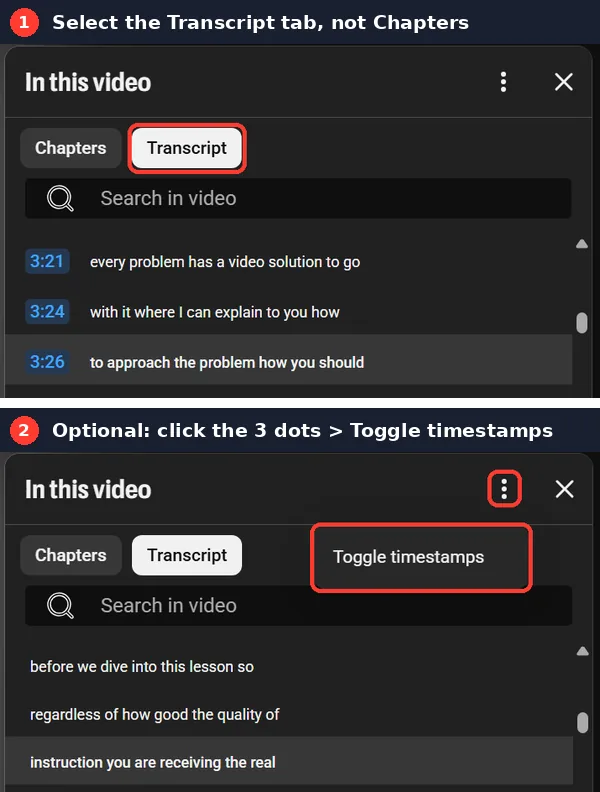
- In the transcript panel, make sure the “Transcript” tab is selected, not “Chapters.”
- Click the three dots and choose “Toggle timestamps” if you want text without times.
- Click at the start of the text, scroll down, hold Shift, and click at the end. Then copy it.
The mistake that cost me time
When I first copied the transcript on my laptop, I only got chapter headings and times, like “0:00 Intro.” On my phone, the same video showed the full text.
The reason: on videos with chapters, the laptop panel has two tabs. “Chapters” shows only the chapter titles. “Transcript” shows the full text. I had the Chapters tab open.
If you cannot find “Show transcript,” that video may not have a transcript available. Skip it, or watch the key parts at normal speed.
(YouTube changes its layout often. These screenshots are from October 2026.)
Step 4: Turn Each Transcript Into Notes
A copied transcript is long and messy. It breaks into short lines, so it helps to join it into normal paragraphs first. Then turn it into notes. You can do this by hand, or with an AI tool.
Here is a real example. This is a small part of a physics lecture on acceleration, summarized in my own words:
The speaker explains that acceleration is about change, not speed. A dropped ball does not fall at one steady speed. It starts slowly and speeds up the whole way down, and gravity adds a little more speed every instant. The formulas for motion are shortcuts for putting numbers on those ideas.
And the notes made from it:
- Acceleration = change in speed, not speed itself
- A falling ball speeds up the whole way down
- Gravity adds a little speed every instant
- Motion formulas are shortcuts to put numbers on these ideas
- Self-test question: Why does a falling ball not move at one steady speed?
A few lines of transcript became four points and one question. That is the shape you want for every video.
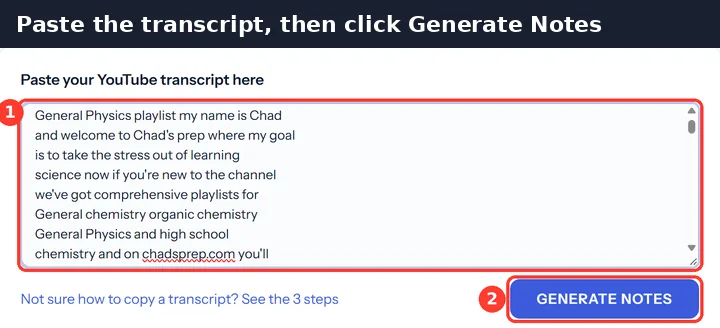
Want to save time? If you don’t want to format and shorten every transcript yourself, you can try Quick AI Notes to turn a YouTube lecture transcript into shorter study notes.Try YouTube to AI Notes →
Always check the notes against the transcript, because AI can miss or change details.
Related: Convert YouTube lectures into notes for exams
Step 5: Blurt Before You Check
After each video or group of notes, close everything and write down all you remember on a blank page. This is sometimes called blurting. Then compare it with your notes and mark what you missed.
It feels harder than rereading, and that is the point. The effort of recalling is what helps memory.
Step 6: Make a Playlist Cheat Sheet
Combine your notes into a 2 to 3 page cheat sheet. A simple table works well:
| Topic | Key points | Formula or definition | Common mistake |
|---|
This is what you will read the night before. If it is longer than three pages, shorten it again.
Step 7: Practice With Questions
Videos teach you the topic, but exams test you with questions. Use practice questions, textbook problems, or past exams for each topic.
If you do not have any, turn each video into three questions yourself:
- Explain this idea in your own words.
- Why does this happen?
- Solve one example without looking.
Anything you cannot answer goes back into the red group.
Step 8: Use a Simple Plan (With a Buffer )
Here is a 3-day plan for a playlist of about 25 videos:
| Day | What to do |
|---|---|
| Day 1 | Sort videos, read transcripts for red videos, write notes |
| Day 2 | Cover yellow videos at up to 2x for easy topics, build the cheat sheet |
| Day 3 | Blurting, practice questions, fix weak spots |
| Last 2–3 hours | Buffer: catch up on anything you missed. Do not start new videos. |
If you have more time, see: Can you revise YouTube lectures one day before an exam?
Common Mistakes to Avoid
- Starting from video 1 just because it is first. Start from your weakest high-mark topic.
- Watching at 2x for everything. Hard topics need normal speed.
- Making notes while watching every minute. You will lose the lecture and waste time. Pause at the end of each concept instead.
- Never testing yourself. Watching feels productive, but it is not proof that you know the topic.
- Adding more playlists. One good playlist, finished properly, beats three half-watched ones.
Quick Checklist
- Total playlist hours checked
- Exam days and daily study hours counted
- Videos sorted into green, yellow, and red
- Speed chosen for each group
- Notes made from transcripts
- Last day kept for practice and review, with no new videos
FAQs
How many hours of YouTube lectures can I realistically finish in a day?
Most students can focus on 3 to 4 hours of lecture content per day. At 1.5x speed, that covers about 4.5 to 6 hours of playlist time.
Is it okay to watch lectures at 2x before an exam?
Yes, for topics you already partly know. For new or difficult topics, use 1x to 1.5x, otherwise you will watch more but understand less.
Can I skip videos in a playlist?
Yes. A playlist is made to cover a complete course, but your exam covers only some parts. Use your syllabus and past papers to decide what to skip.
Should I take notes while watching or after?
After each concept or video. Writing continuously while watching makes you miss the explanation and slows you down.
How can I get notes from a long lecture quickly?
Copy the transcript from YouTube (Show transcript) and condense it, either manually or with a transcript-to-notes tool. Keep only definitions, steps, formulas, and examples.
Final Thoughts
A playlist is a resource, not a revision plan. Check its real length, sort the videos, read transcripts, turn them into short notes, and test yourself. That is a plan you can finish.
You don’t need to finish the playlist. You need to identify what is worth revising.