Your exam is tomorrow, and you’re watching a two-hour lecture, but you still have no idea which parts are most important or what is most likely to appear on the exam. You want to focus on those important parts, but a YouTube lecture isn’t like the pages of a book that you can quickly flip through to find what you need.
Even if you watch the lecture at a faster speed, your preparation may still not be very productive. And if you extract the transcript from the video, it can still be difficult to find the important points in such a long block of text.
Many students struggle to make proper notes from YouTube lectures. So, what is a better way to convert YouTube lectures into notes for exams preparation?
A better approach is to turn the video into well-structured notes that highlight the important points from the lecture. This makes the material easier to review and gives you a useful resource for active recall when preparing for your exam.
Why Watching a YouTube Lecture Isn’t Enough for Exam Revision
Once, I had a physics lecture on YouTube that was more than an hour long. I watched the entire lecture because it explained everything really well—with diagrams, examples, and formulas explained in a very clear way. But later, when I needed to find a specific piece of information, I had to go back and check the video again, constantly pausing and playing it to find where that particular point or formula was explained. This made things even more confusing.
YouTube is like a classroom, but when exam revision days come around, the problem is figuring out how to go through those videos again and remember everything. The YouTube video itself isn’t the problem—the real problem is that videos aren’t easy to scan, review, or quickly revisit.
That’s when we need a little bit of “magic”: a tool that can simply convert a YouTube lecture into organized notes that we can easily access anytime, quickly review any topic, use active recall, and prepare for exams more effectively.
What Should Good Exam Notes Include?
When we talk about exam notes, we want notes that make the whole topic clear as soon as we look at them. We should be able to understand what the lecture was mainly about, what points it covered, and easily read and remember the information from anywhere. The headings should also be clear and well organized.
According to Cornell University’s Learning Strategies Center, effective notes should be useful for later review and studying. This means your notes should help you quickly find and understand the information you need when preparing for an exam.
Exam notes do not simply mean making a YouTube lecture shorter. Instead, they should be designed in a way that makes the important information easy to understand and quick to review before an exam.
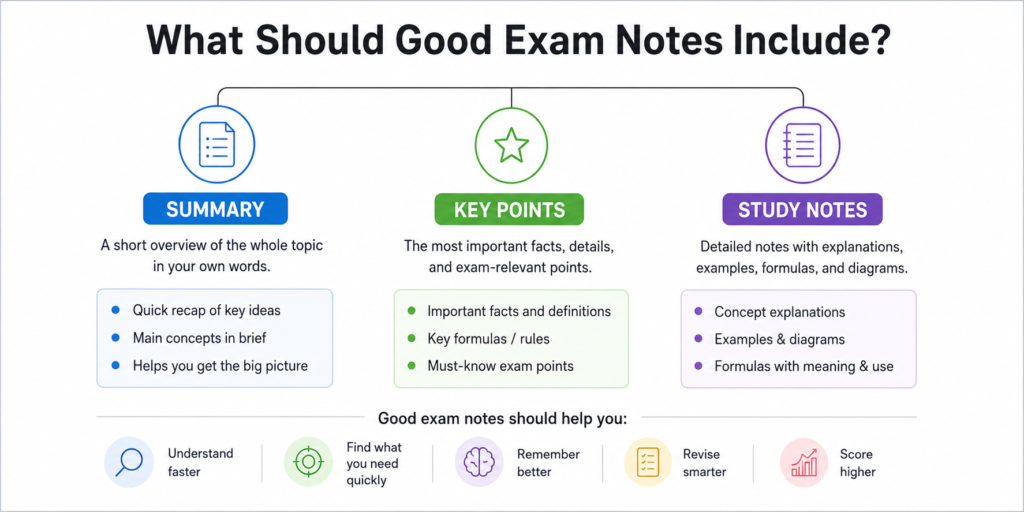
Quick Summary
A short recap of your entire lecture.
Key Points
The main ideas from the lecture, explained in simple words.
Study Notes
Exam-relevant facts and details from the entire lecture, including formulas, their meanings, how to use them, and examples.
Together, these help you understand the topic quickly, remember it more easily, and prepare better for your exam.
3 Ways to Convert YouTube Lectures Into Notes for Exams.
To convert a YouTube video into notes, you need a good workflow so the notes don’t end up messy and require you to fix everything yourself later. Everything should be clear and well-organized.
There are three different ways to convert a video into notes, and each method is better suited to a different situation.
Manual note-taking
Manual note-taking can take quite a lot of time, but it can still work well in some situations. For example, if you’re watching a short lecture or the lecture feels easy and the topic doesn’t have too many details, making the notes yourself can be a good option.
One benefit of taking notes yourself is that you remember quite a lot while writing, and your attention stays focused on the topic. But if the video is long and packed with details, it’s probably better to skip manual note-taking. If you’re also short on time or the lecture is very confusing, making notes manually can quickly become difficult and frustrating.
YouTube transcript
YouTube’s generated transcript is definitely a fast and free option, but honestly, I’ve never found it very useful. I often find it difficult to read and understand, and I’ve ended up confused more than once. So, I wouldn’t really recommend it.
You do get the lecture in text form, but the problem is that you still have to figure out which points are important, what you can skip, and what you actually need to remember. If it’s a short and simple lecture, the transcript can be fine. But if you’re dealing with a complex subject, simply getting the lecture in text form doesn’t help much.
AI YouTube-to-notes tools
Now let’s talk about creating notes with AI, which I consider the smartest way to revise quickly for exams. This is the method I would choose for any student because it makes studying easier, faster, and more manageable.
An AI model converts your YouTube video into text and then summarizes it in a smarter way. You can immediately see what the entire lecture is about without having to watch the whole video again. It also gives you detailed, exam-relevant notes in clear, highlighted bullet points, along with examples, making them much easier to read and understand.
The best part is that you can easily access and revise these notes from anywhere, whenever you need them. And because you can also test yourself using tools like flashcards and MCQs, you’re more likely to remember what you’ve studied instead of forgetting it soon after.
.
If you want to see exactly how it works and how it can help you create better notes, I’ll explain the whole process below.
How to Convert a YouTube Lecture Into Exam-Ready Notes Using AI
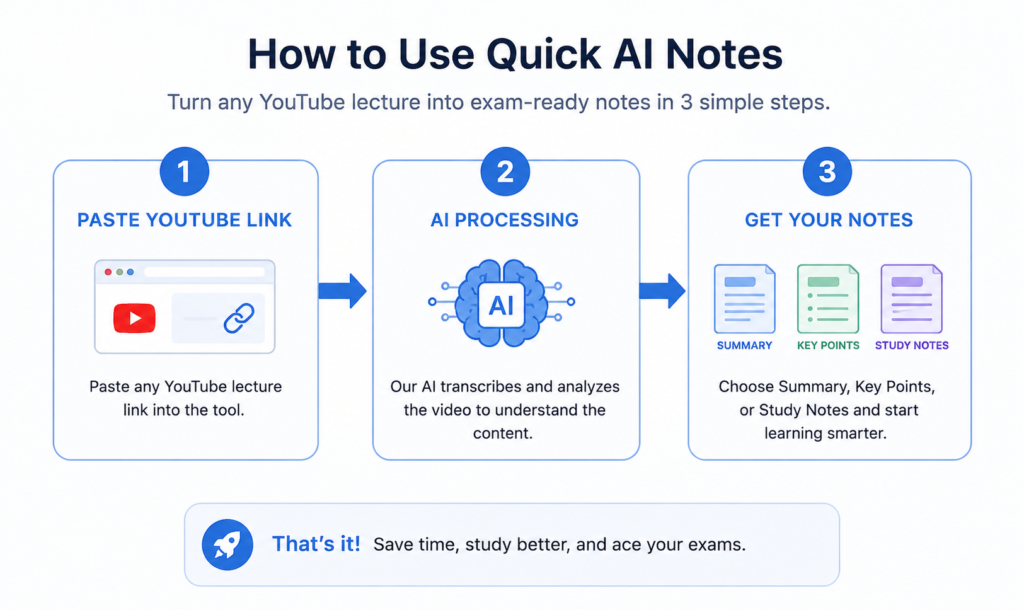
Step 1 — Copy the YouTube URL
Simply paste your URL into the tool. You do not need to provide a transcript—the tool will automatically extract the transcript in the backend and use the original transcript to process your notes.
Below the tool, you will find different buttons for the types of notes you want to create. Simply select the option you need, and the tool will generate the notes for you.
Step 2 — Create the summary
Once the AI process is complete, you’ll first receive a summary of your lecture. It will give you a short overview of your long and complex lecture, making it easy to understand what the entire lecture covers.
Step 3 — Extract key points
You’ll get all the main points from the lecture, making them easy to review. These are the key points from the entire topic that you should focus on, and they are also relevant to your exam.
Step 4 — Create detailed study notes
In the Study Notes section, you’ll get detailed notes generated from your lecture. You’ll find the main headings, examples, formulas, and all the important details covered in your lecture. You can use these notes to revise any topic whenever you need to, and they are easy to read, so you can quickly understand and remember the material without spending too much time.
I often generate my own notes this way, and it makes studying much easier. You can also save the notes on your laptop or mobile device and access them whenever you need them.
Ready to turn your YouTube lecture into notes? Try [Quick AI Notes] and get organized study notes from your lecture.
For more detailed study and revision, you can also generate MCQs and quizzes to test your knowledge.
Example: Turning a 40-Minute Physics Lecture Into Exam Notes
Physics is a favorite subject for some students, while for others, it can be quite complex. You have to cover everything—from formulas, numericals, and examples to explanations and definitions. And if your lecture is 40 minutes or longer, things can become even more difficult.
You can always replay a lecture on YouTube, but figuring out which points you should focus on, what you need to remember, and which information is actually important for your exam can feel quite hectic.
Instead of spending 40 to 50 minutes watching the entire video, Quick AI Notes generates organized notes for you. You can read through your notes in about 10 minutes and quickly review the important information. You can also use MCQs and quizzes to practice the formulas and definitions, which makes it easier to remember them.
I used the same method to prepare for my own exams. I could take long lectures and revise the important material in just 15 minutes, which made my exam preparation much easier and faster.
How to Take Notes From a 2-Hour Lecture When Your Exam Is Tomorrow
Imagine you have a 2-hour lecture to prepare for, but you are short on time.
Normally, you would have to watch the entire lecture, extract the transcript, and then use another tool to turn that transcript into notes. That can take a lot of time.
But with Quick AI Notes, you only need to paste the lecture URL. The tool automatically processes the lecture and generates well-organized study notes for you.
You don’t have to watch the entire 2-hour lecture just to understand what the teacher is talking about. You can get a quick overview of the lecture and see its main headings at a glance. This makes it much easier to understand the structure of the lecture and can even make you more interested in learning the topics.
And if you want to make sure you don’t forget what you studied during the exam, you can generate flashcards and MCQs from the same lecture. These are great for active recall and help you test yourself instead of simply reading the notes again and again.
The next morning, you can quickly review your flashcards and MCQs before your exam. In this way, you can revise the important concepts without going through the entire 2-hour lecture again.
Instead of spending hours watching, transcribing, organizing, and revising a lecture, you can turn it into structured study material and prepare much more efficiently when time is limited.
Mistakes You Should Avoid When Making Notes from YouTube Lectures
There are a few common mistakes students make when turning YouTube lectures into notes. I want to highlight these mistakes so you can avoid them.
First, don’t wait until your exams are near and then start watching the entire lecture from beginning to end again. You can always revisit a lecture when needed, but watching the whole video again just before an exam can waste a lot of valuable time.
Second, there are many AI tools available online that can generate notes for you. Pick a reliable tool that you trust and use it to create your study notes instead of trying to do everything manually.
Third, many tools ask you to provide the transcript and then generate notes from it. This can waste your time because you first have to find and copy the transcript. You may also make mistakes while copying it, which can affect the quality and accuracy of the notes generated from it.
Fourth, many students make the mistake of treating the summary as their final study notes. A summary only gives you a quick overview of the lecture. Your detailed study notes should include the exam-relevant information you actually need to study and remember.
Fifth, don’t generate too many MCQs and quizzes. Creating a huge number of questions can make revision overwhelming and make it difficult to remember the important information. Focus on a manageable number of useful questions that help you test what you have learned.
Finally, don’t forget to review your notes in the morning. Even if you have already studied them, take a few minutes to go through your notes once more. A quick review can help refresh your memory and keep the important points fresh in your mind.
Manual Notes vs AI-Assisted Notes
| Feature | Manual Notes | AI-Assisted Notes |
|---|---|---|
| Time required | Takes more time, especially for long lectures | Saves time by generating notes quickly |
| Long lectures | Difficult to cover every important point | Can process long lectures and organize the information |
| Important points | You have to identify important points yourself | AI highlights key information for easier revision |
| Formulas & definitions | You need to find and write them yourself | Can organize formulas, definitions, and explanations |
| Examples | You have to note down useful examples while watching | Can include important examples from the lecture |
| Organization | Notes may become messy or inconsistent | Notes are usually structured with headings and bullet points |
| Revision | Can take a long time to review | Easier and faster to scan and revise |
| MCQs & quizzes | You have to create questions yourself | Can generate MCQs and quizzes for practice |
| Best for | Short or simple lectures and topics you already understand | Long, detailed, or complex lectures when you are short on time |
| Main drawback | Time-consuming and easy to miss important points | AI-generated notes should still be reviewed for accuracy |
| Accuracy | You control exactly what you write | You should review AI-generated notes for accuracy |
AI-assisted notes can help organize information from long lectures, making important concepts easier to review. However, you should still check the generated notes against the original lecture when accuracy matters.
Final Thought
Converting long YouTube lectures into notes is no longer a task that takes hours—it can now be done in minutes. I don’t have to watch the same lecture over and over again or write down every single word. My goal is to understand the topic, study it properly, and revise it later.
AI has made this process much easier for me. I have personally found it very helpful, especially when exams are approaching. Before, whenever I saw a long lecture, I would feel overwhelmed and wonder how I was going to cover so much material. Now, I don’t feel that same pressure. I can quickly organize my notes and focus on the most important points.
The MCQs and questions have made studying even easier for me. They help me review what I have learned and make my exam preparation more focused and manageable.
Of course, AI-generated notes should not completely replace your own understanding. Use them as a study aid, check important information when needed, and make sure you actually understand the topic.
FAQs
Q: Can I rely on AI tools to prepare for my exams?
Yes, AI tools can help you prepare for your exams. However, instead of relying on multiple tools, it is better to choose one reliable tool that is designed to support your exam preparation. You can create notes with the tool and use them as part of your study and revision.
Q: Can AI create notes from videos on any subject?
Yes, you can create notes from videos on almost any subject, as long as the video is educational and relevant to your studies.
Q: What types of students can benefit from AI study tools?
Students from almost any field can benefit from AI study tools. Whether you study accounting, medicine, science, or another subject, Quick AI Notes can help you turn educational lectures into organized study notes.
Q:How much can I rely on AI tools for my studies?
AI can be especially helpful when you have difficulty understanding complex concepts, when the material is very detailed, or when you have limited time, especially when your exams are approaching and you need to work through complex notes quickly.